

How to Add Live Comment Preview to Comment Textarea without Plugin
21st Mar 2011 | Posted by reza | 26 CommentsThe comment live preview feature helps the comment writer to see what they are writing in the comment form as they write. This feature works well to help prevent errors in spelling and grammar by giving the user a chance to see what they are writing before they post their comment.
Seeing a preview of your comment gives the user a second chance to change his or her mind. This can also give them a second chance to reword their comment, if they are responding out of emotion rather than logic and kindness.


It also helps when the discussion involves programming code. If the user can see whether or not their < php code(); ? > will appear in the comment or turn to mush and jumble. It can prevent two and three attempts to post the code, with a lot of apologizing and frustration on their part and yours when you find all the attempts to post the comment.
There are plugins to add this feature to your WordPress site, but many says using too many plugin is not recommended. This simple tutorial will help You add the feature without those plugins.
The tutorial will only use jQuery function and css styling to add the feature.
How to
- First we need to integrated jQuery to our theme
add this code to header.php file, right before wp_head();<?php wp_enqueue_script('jquery'); ?> - Secondly, add this script right before < / head > , also in the header.php
<?php if (is_single()) { ?> <script type="text/javascript"> jQuery(document).ready(function(){ jQuery("").add("<h3 id='preview-title'>Comment Preview</h3><div id='comment-preview'></div>").appendTo(document.body); jQuery("#comment-preview, #preview-title").insertAfter("#comment"); var $comment = ''; jQuery('#comment').keyup(function() { $comment = jQuery(this).val(); $comment = $comment.replace(/\n\n+/g, '<br /><br />').replace(/\n/g, "<br />"); jQuery('#comment-preview').html( $comment ); }); }); </script> <?php } ?> - And last, styling live comment preview.
We can style the feature using ID #comment-preview and #preview-title”.
Add these codes to you style.css
#comment-preview {
	border: 1px solid #ccc;
	padding: 5px 15px 15px 15px;
	}
h3#preview-title {
	margin-bottom: 5px
	}
Or You can style the feature with your own taste, using those two ID
Now, your comment has a nice live comment preview feature.
Preview

You can see the demo here: DEMO
Hope this tutorial helps.
Credit: http://lorelle.wordpress.com


19 Comments to “How to Add Live Comment Preview to Comment Textarea without Plugin”
Add Comments (+)-
Solved the problem. I had to change “.appendTo(document.body);” to “.appendTo(document.main);”.
-
-
I’m afraid to take that back. Since I had changed this part it didn’t work at all. Thus I had to remove it. The error: When one is on the ” Home ” page, you can see the preview field in the background, just like I would have put it between the div tags in the header.php. But that’s not the case.
-
-
thanks for the precious feedback
replace the code above with:
<?php if (is_single()) { ?> <script type="text/javascript"> jQuery(document).ready(function(){ jQuery("").add("<h3 id='preview-title'>Comment Preview</h3><div id='comment-preview'></div>").appendTo(document.body); jQuery("#comment-preview, #preview-title").insertAfter("#comment"); var $comment = ''; jQuery('#comment').keyup(function() { $comment = jQuery(this).val(); $comment = $comment.replace(/\n\n+/g, '<br /><br />').replace(/\n/g, "<br />"); jQuery('#comment-preview').html( $comment ); }); }); </script> <?php } ?> -
-
Thank you, i implemented on my site :).
Any idea for parsing the default wordpress shortcodes and smileys?
-
-
-
Nice article, been searching for it and finally I found it. Great job, your a big help.
-
 joseph says:
 Nice plug in.
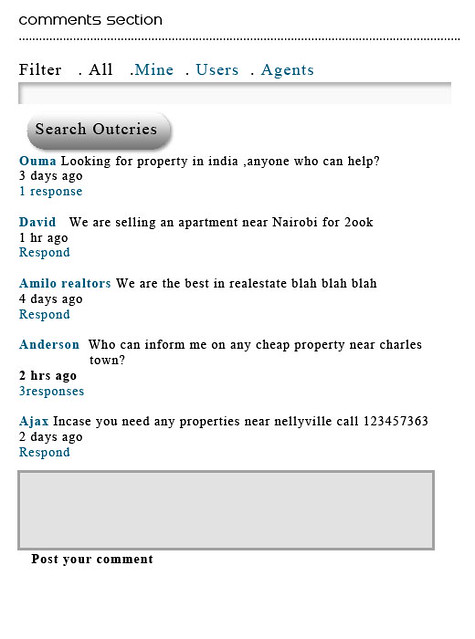
Is there a way the plugin can publish the comments immediately the user clicks the post button and the comments can be categorized when posting e.g for buyers,sellers etc such that if am a seller i just need to go to the seller tab and post my comments there and same for a buyer or even an all section where all comments can appear and also maybe have a search box for searching the posted comments.
The image linked below shows what am talking about
http://farm7.static.flickr.com/6218/6351664270_27b100de66_z.jpg
Your response will be of great help.
Joseph. -
That’s super cool. I never thought that it was possible by just using some php through jquery. I’ve seen plenty of plugins that do this, but it seems like a bloated way to accomplish what you’ve come up with that works very cleanly. I’m definitely going to use this on a couple of my blogs. Thanks.
-
 strangerrj says:
 Hello and thank you for the very good plugin. It is very good and runs smoothly.
Cheers
-
Hi to all, how is all, I think every one is getting more from this website, and your views are good in support of new viewers.
-
Great and very knowledgeable post. explanation of preview comment is amazing you have define.
-
 Judy says:
 Because the admin of this web site is working, no question very quickly it will be renowned, due to its feature contents.


Trackbacks/Pingbacks
- [WordPress Tutorial]How to Add Live Comment Preview to Comment Textarea without Plugin | WebDevKungfu
- How to Add “delete” and “spam” Buttons to Your Comments
- 70 Excellent WordPress Tips And Tutorials From First Three Months Of 2011 | stylishwebdesigner
- how to add live comment preview in comment section without plugin | Zaryl Dot Com
- 非插件实现WordPress评论实时预览功能 « 清水依华
- 15 Hacks to Pimp Your WordPress Website | Template Monster Blog
- 30 useful wordpress tips




Hi,
first of all, thank you for the great tutorial. Unfortunately theres an error when im doing it the way its explained here. Maybe you could have a look at my site (http://www.biggaa.de). At the moment its under construction and its my own theme.
Thanks and greetings from Germany!